


Media buying rarely involves just one task or one set of tools. Today, you’re setting up browser profiles to launch ads. Tomorrow, you’re connecting to a new application. Next week, your team is expanding into another GEO.
Sourcing proxies separately for every workflow can quickly become a headache: multiple dashboards, different billing models, unfamiliar settings and separate support teams. Instead of preparing campaigns, buyers end up maintaining their tools.
That’s why choosing a proxy service is about more than IP addresses and pricing. It’s also about how easily the service fits into your daily workflow. For these tasks, we recommend SX.org: a single platform where you can choose different proxy types, find a suitable billing model and configure connections for the tools your team already uses.
Different Workflows Need Different Connections
One proxy setup won’t necessarily suit every advertising task. Some workflows require a consistent IP address; others call for controlled IP rotation. Sometimes country-level targeting is enough. In other cases, you need more specific network settings.
SX.org offers mobile, residential and corporate proxies, with both fixed-IP and rotating options. This lets you choose a connection around your workflow rather than adapt your workflow to a restrictive plan.
| Your requirement | What to look for |
|---|---|
| A consistent IP address | Fixed-IP proxies |
| IP changes as part of the workflow | Rotating proxies with suitable rotation settings |
| A connection through a particular network | GEO selection and available ASN filters |
| Higher connection-quality requirements | Premium proxy options |
| Multiple tools and use cases | Different proxy types managed from one dashboard |
Keep in mind that a fixed IP and a reliable connection are two different things. One describes whether the address changes; the other describes how consistently the connection works. Both matter when choosing your setup.
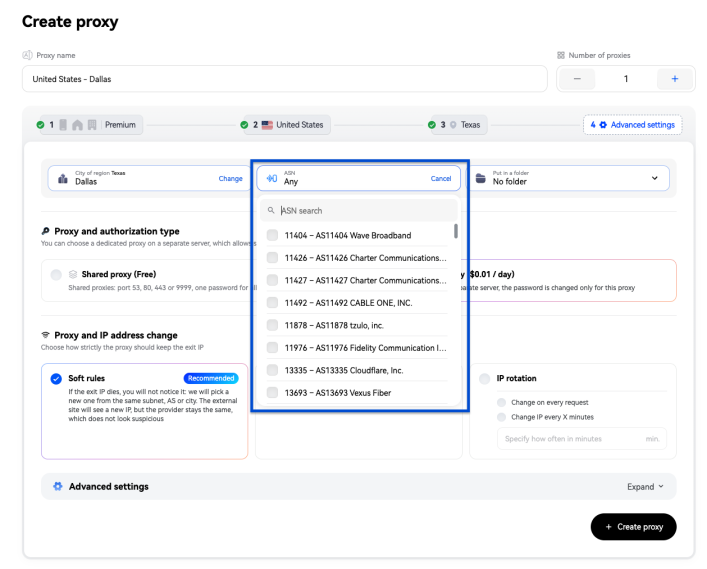
Beyond Country Targeting: Why ASN Selection Matters
Choosing a GEO is a starting point. But some workflows require more than an IP address in a particular country: they need a connection associated with a specific carrier or internet service provider.
That’s where ASN selection comes in. An Autonomous System Number identifies the network an IP address belongs to, helping you narrow down your connection requirements.
SX.org offers a broad choice of countries alongside available ASN selection options. This is useful when your team has specific technical requirements that country-level targeting alone won’t meet.
If you’re unsure which settings your workflow needs, contact support with your use case, target GEO and the software you plan to use.
Pay per GB or Go Unlimited: Match Your Plan to Your Usage
Affordable proxies aren’t just about the lowest advertised price. What matters is how much the connection costs at your actual usage level - and whether you’re paying for capacity you don’t need.
SX.org offers both traffic-based billing and unlimited-traffic plans, so you can choose a model that fits your workload.
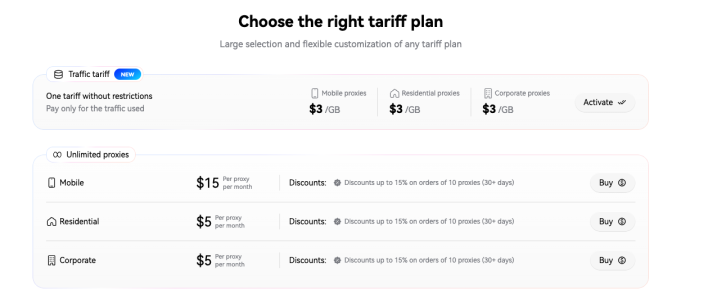
Traffic-Based Billing
Paying for the traffic you use is worth considering for initial tests, occasional tasks and workflows with measurable data usage. You can start small, track consumption and use the results to plan your budget.
Unlimited-Traffic Plans
An unlimited-traffic plan is worth considering if your connections are in regular use and transfer substantial amounts of data. Check the specific offer’s duration, speed limits and simultaneous connection allowances before choosing.
For a meaningful comparison, measure usage over a typical working day and estimate the monthly cost. That gives you a plan based on how your team actually works, rather than an attractive headline price.
When to Consider Premium Proxies
Testing a new tool and supporting a team’s day-to-day operations can place different demands on a connection. The more important continuity is to your workflow, the more carefully you should assess the available options.
SX.org also offers premium proxies for tasks with higher connection-quality requirements. When choosing an offer, ask what sets it apart from a standard option: network characteristics, usage conditions and connection settings.
Rather than choosing on the strength of the “premium” label alone, describe your workflow to support. This helps you understand which benefits matter to your task and whether the upgrade is worthwhile.
Neither a premium plan nor a particular IP type replaces compliance with an advertising platform’s rules or guarantees that an account won’t face verification checks.
Connect to Your Existing Antidetect Browser - Without Copying Every Setting
Proxies should fit into your team’s existing setup. If your buyers already use an antidetect browser, switching tools or manually transferring connection details adds unnecessary work.
SX.org provides ready-made, one-click connection options for popular antidetect browsers. Instead of copying the host, port, username and password separately, select the option for your supported browser and add the proxy with a single click.
This is particularly useful when preparing multiple browser profiles: fewer manual steps and fewer opportunities to enter a setting incorrectly.
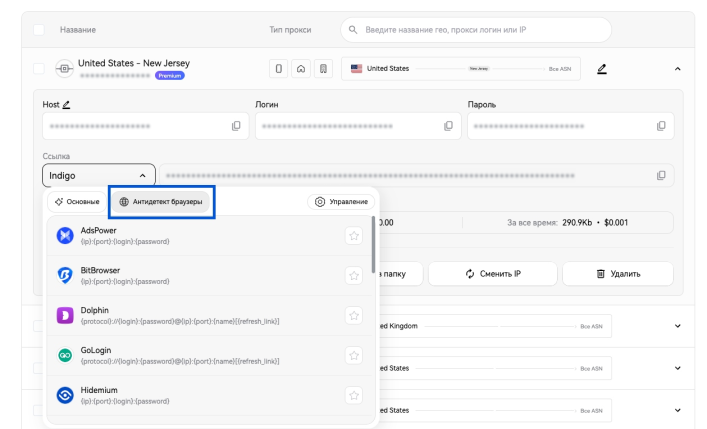
For other software, you can configure the connection manually using the details in your dashboard. If you’re unsure which method to use or how to complete the setup, support can help.
24/7 Support, Whatever Your Time Zone
Your team might work across several countries, launch campaigns in the evening or prepare a new GEO over the weekend. Help needs to be available outside conventional office hours.
SX.org’s support team is available around the clock to assist with proxy selection, connection settings and setup in your chosen tools.
To make troubleshooting easier, include:
- What you need the connection for.
- Your required GEO and network settings.
- The browser or software you’re using.
- The step where the problem occurs.
- Any error message you receive.
If a connection fails, you don’t have to work through every setting on your own. You can explain the issue and ask for help regardless of where - or when - your team is working.
Why Keep Your Proxies in One Place?
When a team uses multiple tools and works across different GEOs, managing connections becomes just as important as the characteristics of an individual IP.
SX.org lets you bring together connections for different workflows: fixed and rotating, traffic-based and unlimited, standard and premium. When a new task comes up, you don’t have to start the selection and setup process from scratch.
For your team, that means one place to find proxies, one support contact and the flexibility to connect suitable options to familiar software.
You don’t need to move your entire setup at once. Start with one regular workflow: prepare a browser profile, upload a typical creative, save a campaign draft and use the connection for a normal working session. Then review usage before adding more tasks.
What Happens to Traffic After the Proxy: Where Budget Leaks
The ad account shows spend, clicks, and the conversions reported by the traffic source, but it doesn’t show what happened to the user between the click and the conversion. This is where leaks often occur: the traffic is paid for, but only part of it reaches a result. The causes are usually technical and tend to repeat: the domain is unavailable or blocked, the server isn’t responding, the landing page loses users at one of its blocks or an event never reaches the source.
The difficulty is that the data you need lives in different places. Server and domain status is visible in provider panels, user behavior on the page in landing page analytics, conversions in the source and spend in the ad account. To find the cause of a drop, the team has to cross-check several reports and the numbers in them often diverge because of different attribution settings and event delivery methods. The more campaigns are running, the more time goes into this reconciliation and the later a decision gets made.
A few simple steps help reduce losses. Alerts about server and domain problems should arrive immediately, rather than being discovered in yesterday’s stats. It’s better to send conversions through two channels, CAPI and the pixel, so that a failure of one doesn’t leave the source without data. An adset’s performance should be evaluated together with what happened after the click, not only by the ad account’s data.
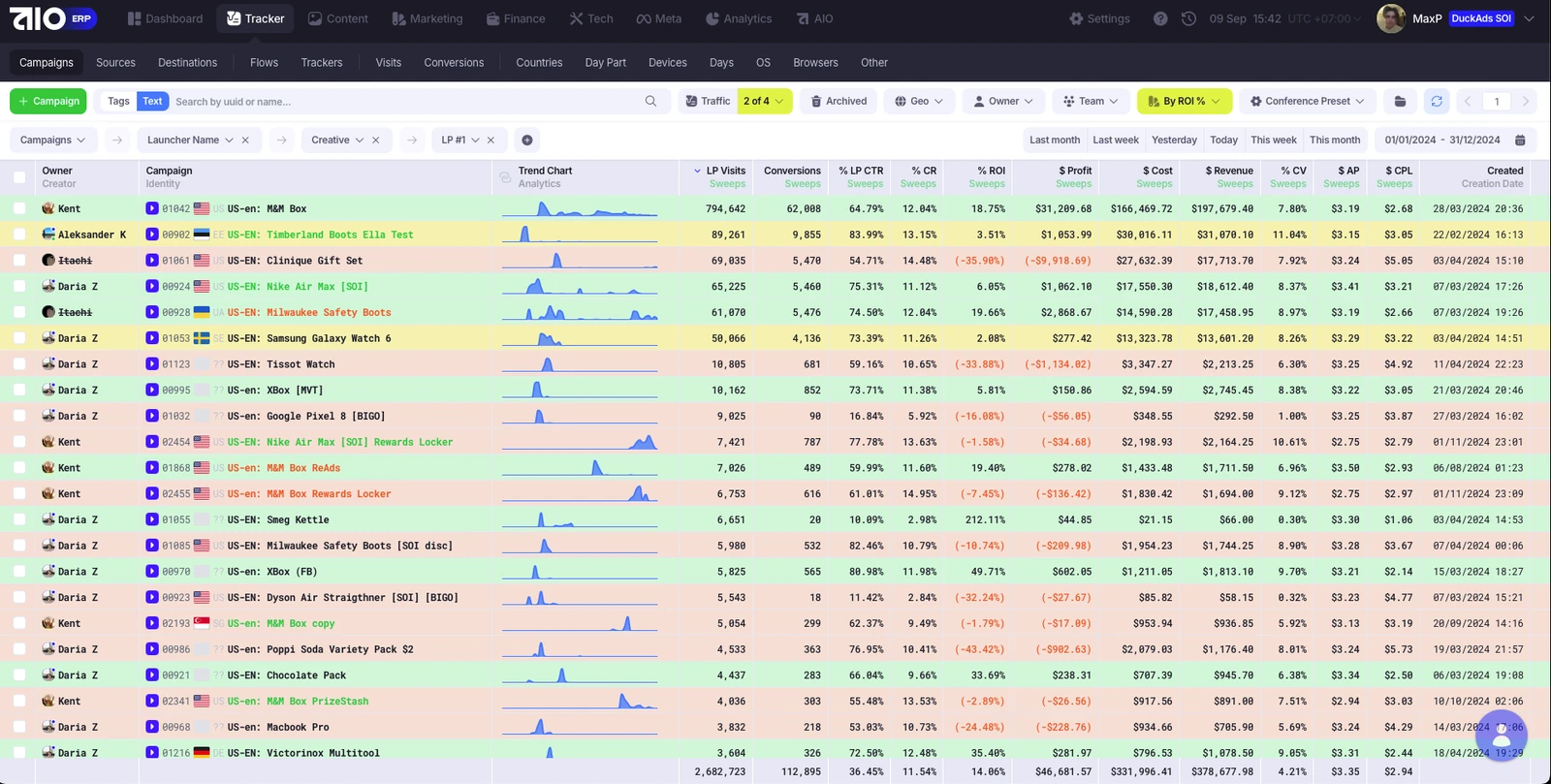
This is easier to do when the data sits in one system. At the core of AIO is a tracker that records events across the entire funnel, from the click to the conversion and revenue. That’s why data on landing pages, conversions and Meta adsets is collected in one analytics view and the cause of a drop can be found in one place instead of across several reports. Servers and domains are connected to the same system and alerts about problems with them arrive in Telegram the moment they appear. For any campaign, it’s worth tracking how many minutes it takes the team to learn about a problem and find its cause: that determines how much budget is wasted.
Try SX.org with 3 GB of Free Traffic
AIO clients can use promo code AIO3GB to get 3 GB of free traffic on SX.org.
Use it to test proxies in your own working environment: connect them to your usual antidetect browser or application, run through a typical workflow and assess the results.
If you need a specific GEO, ASN, fixed IP or rotation mode, let support know. That way, you can start with an option that matches your requirements rather than a connection chosen at random. Check the promo code’s terms and eligible offers when redeeming it.
Your proxy setup should help you launch campaigns, not become another job to manage. That’s why we recommend starting with SX.org: choose connections for your tasks, find a billing model that fits and connect them to the tools you already use - with round-the-clock help when you need it.