Create Sources
What is a Source?
In AIO, Sources represent the places where Visits originate. Each Source in AIO consists of a set of specific fields required for that source. The Source is essential for generating a Campaign link.
In general, Sources are pre-configured link templates used to direct traffic from various marketing platforms such as Facebook Ads, Google Ads, TikTok, etc.
How to Create Sources from Templates (Recommended)
- To view, create, and edit Sources, go to the Sources section.
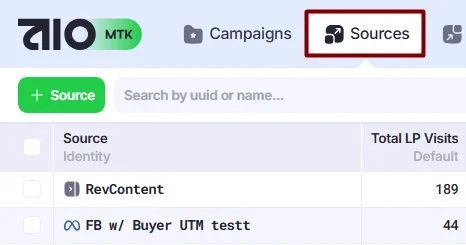
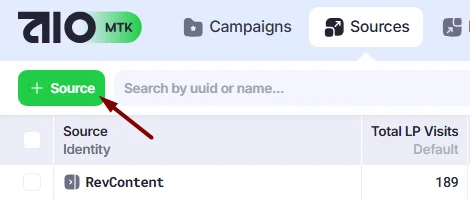
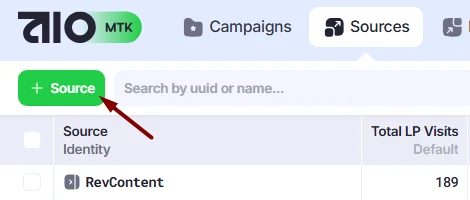
- Click the +Source button to create a new Source.
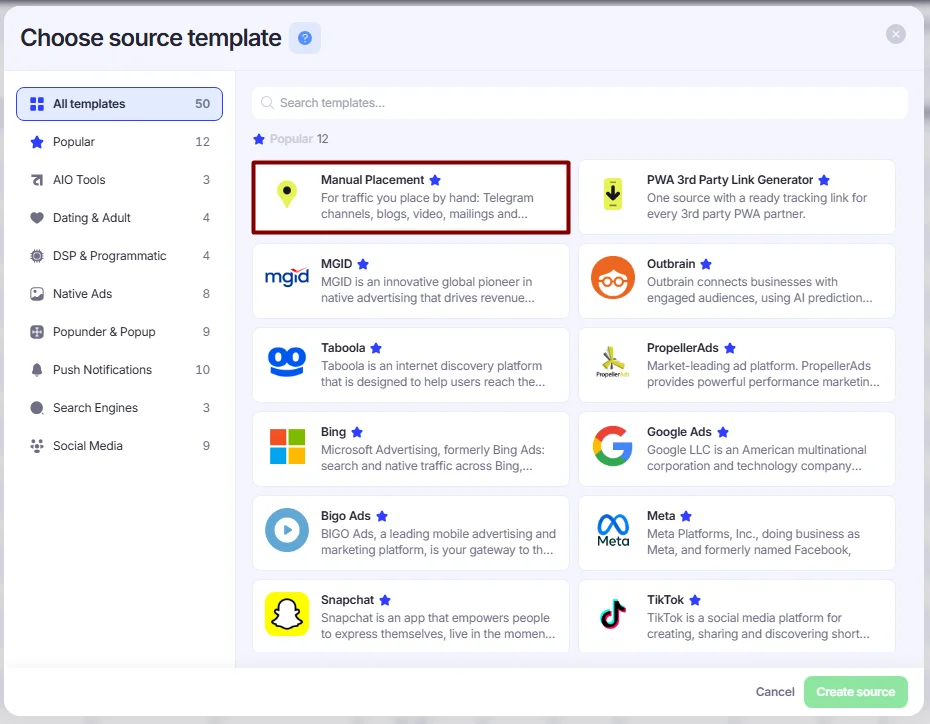
- The Choose Source Template window will appear, where you can select the marketing platform for which the Source will be used.
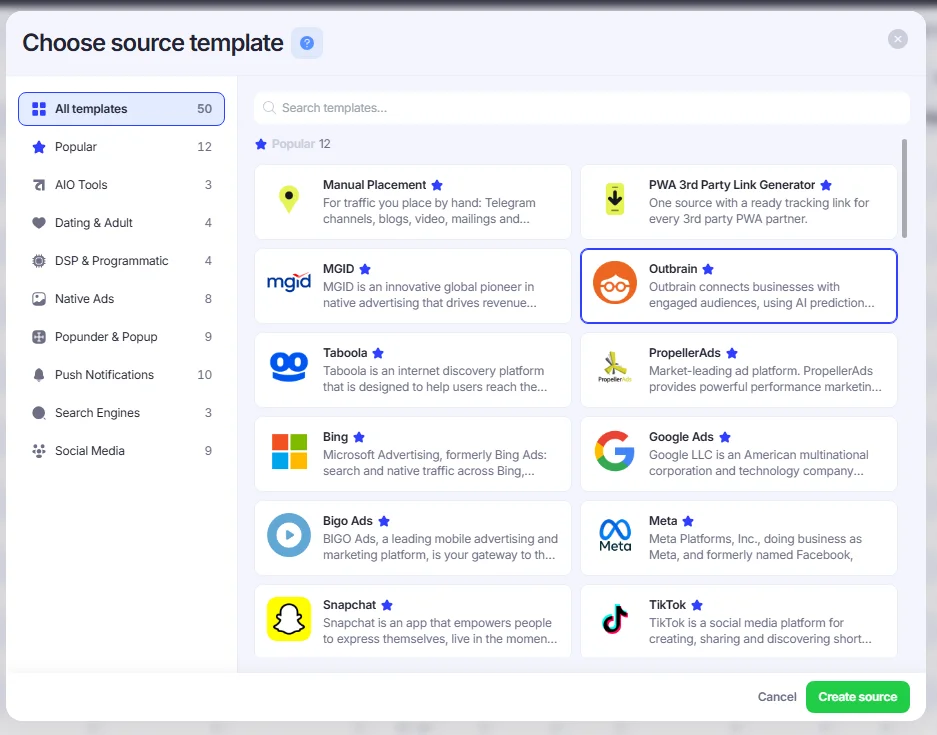
- After you select a Source platform, the source is automatically preconfigured in your tenant with all required fields and is ready to use. However, if you want to customize it, you can edit it manually in the Raw section by modifying the JSON code, or use the Source Builder to edit it visually through the Links, Rewrites, and Replaces sections.
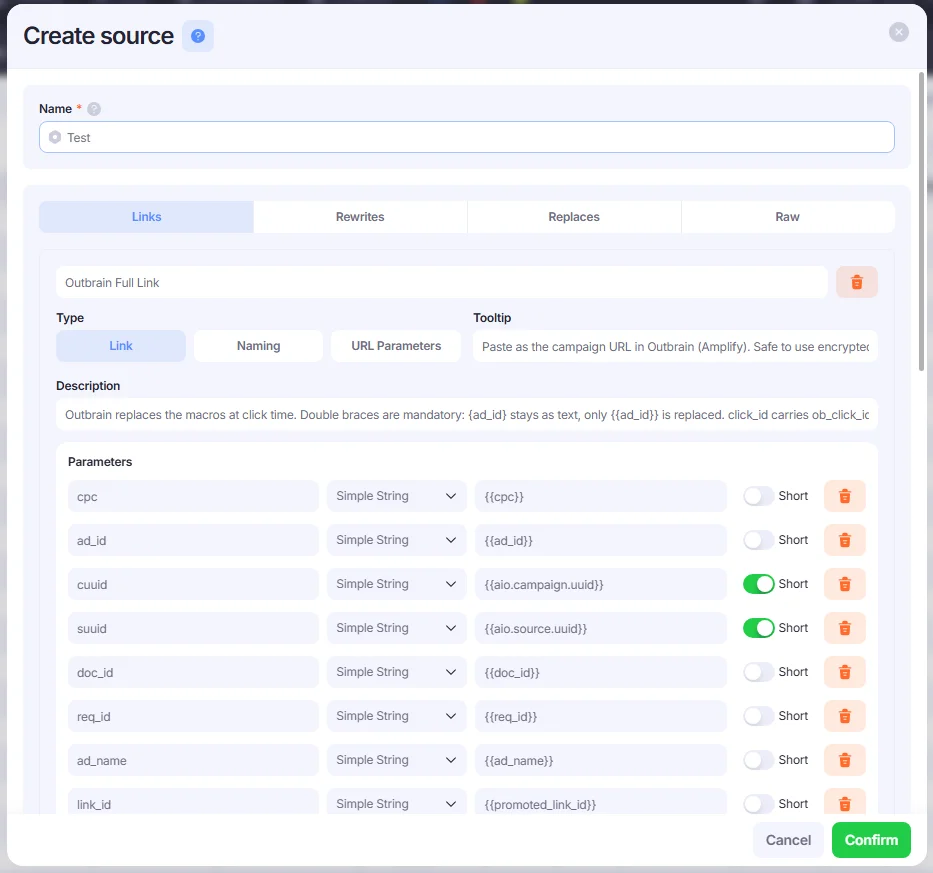
Creating a Source Manually in Source Builder
Please note that your source code must include the fields configured in AIO for this source — otherwise, parameters from tracking links cannot be captured. When you create a source from a template, all required fields are already preconfigured. However, if you build a source from scratch, you need to add the required fields manually.
Since users of the MTK version don’t have access to system fields, please contact our support team for assistance.
Let’s create an example source for Facebook from scratch using the source builder.
- Make sure your tenant contains all the required fields. Each parameter received from tracking links must be mapped to an AIO field, so the first step when creating a new Source is to add the necessary fields. Since users of the MTK version don’t have access to system fields, please contact our support team for assistance.
- Go to Sources→click +Source.
- Select Manual Placement.
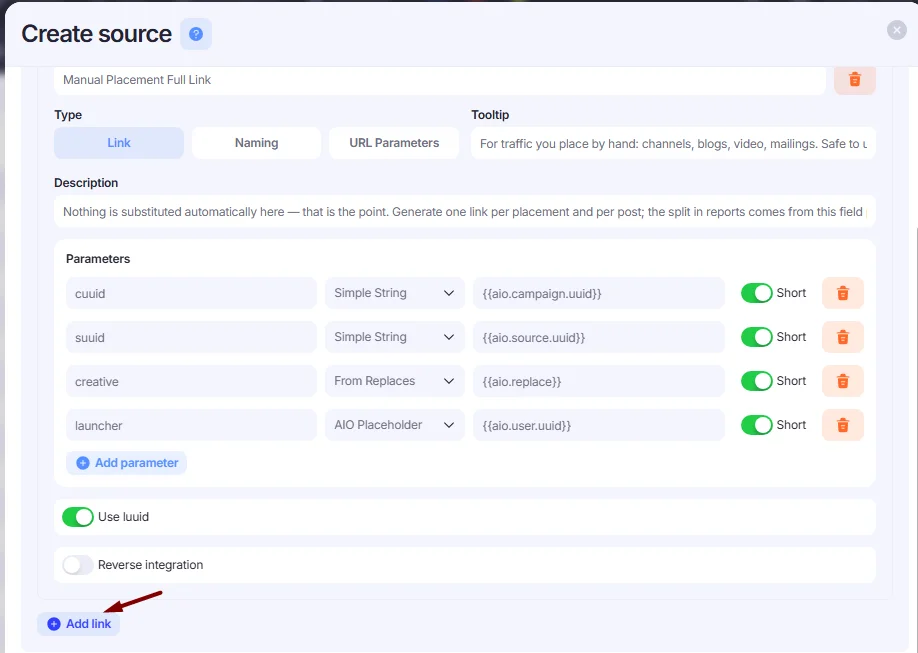
The created source automatically includes all core AIO tracking parameters (cuuid, suuid, launcher), which are essential for our links to work.
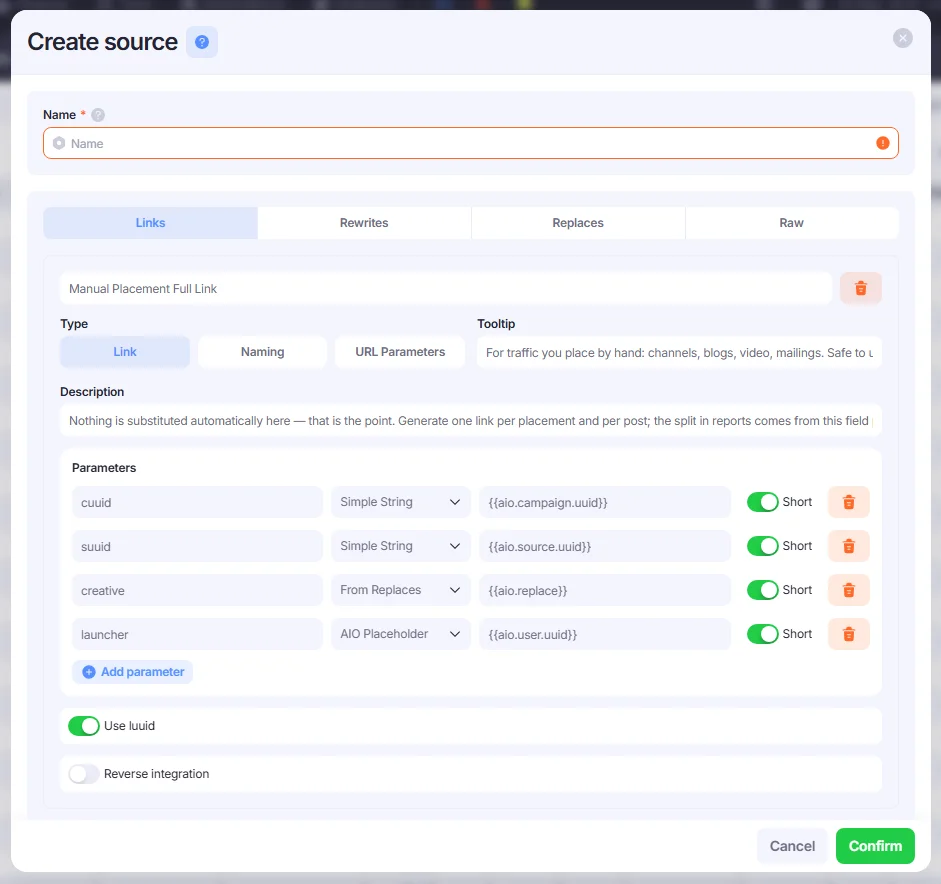
Links
Since the link with the core AIO parameters is preconfigured, you don’t need to create one from scratch. However, you can add additional parameters to the link.
If you need to add an additional link, select the link Type (Link, Naming, or URL Parameters) and click Add Link.

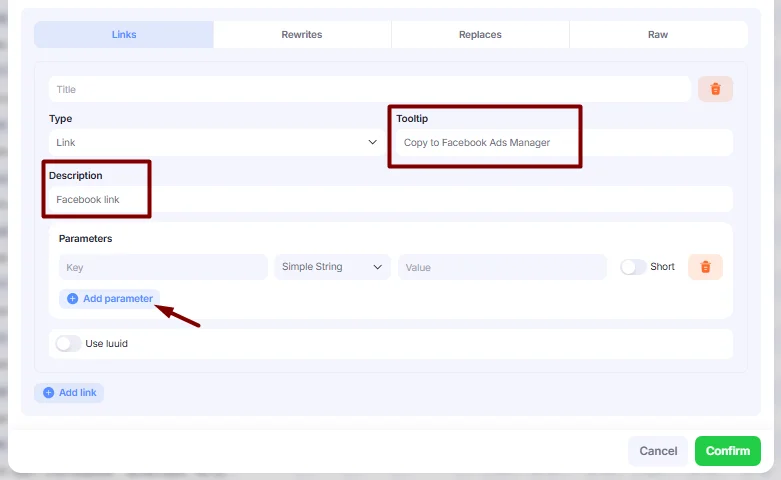
- Enter a tooltip to be displayed in the Link Generator for your Source, along with an optional description. Then click Add Parameter to add template parameters to your Source.
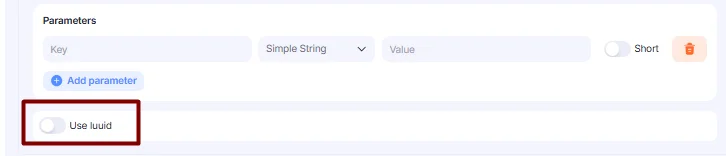
Enable the luuid toggle to allow the link to be used in Encrypted mode. Turn it on if you plan to use the link as an encrypted link later.
- You can enable the Short toggle to encrypt the parameters. When enabled, the parameter will be hidden in encrypted links.
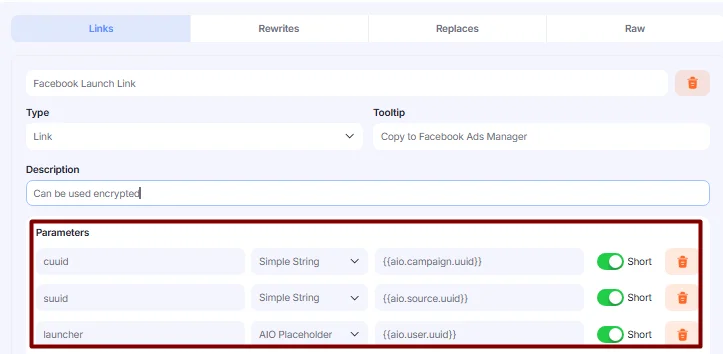
Enable the Short toggle only for AIO core tracking parameters (such as cuuid, suuid, and launcher) or for parameters that are populated in the Link Generator (for example, Pixel or CAPI Token). Do not enable Short for parameters that are populated by the Source itself (such as FB Campaign Name or FB Ad ID). Since these values are resolved on the Source side, encrypted placeholders will not be recognized, and the parameters will not be populated.
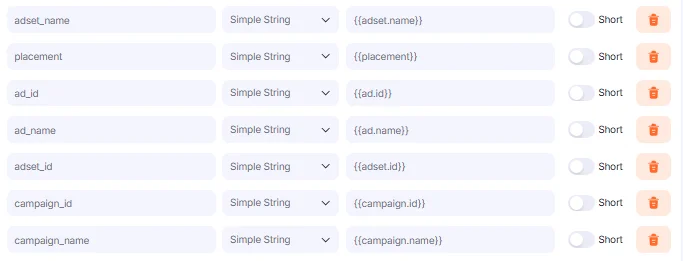
- Add all other parameters that will be used in tracking links. Use the following format:
Field slug from AIO → Field type (use Simple String for parameters populated by the Source) → Field placeholder from the Source side.
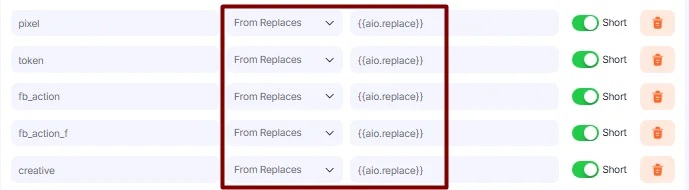
- If any parameters must be populated from the Link Generator, use From Replace and the placeholder
{{aio.replace}}.
Replaces
- To create special fields for parameters that must be populated from the Link Generator (for example, FB Pixel or FB CAPI Token), go to the Replaces block. Click Add Replace.
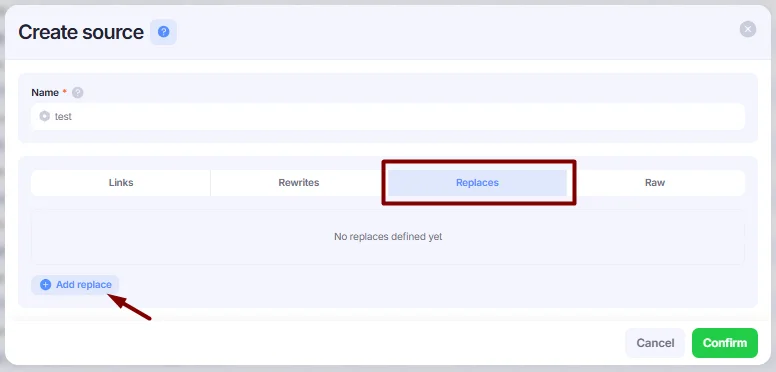
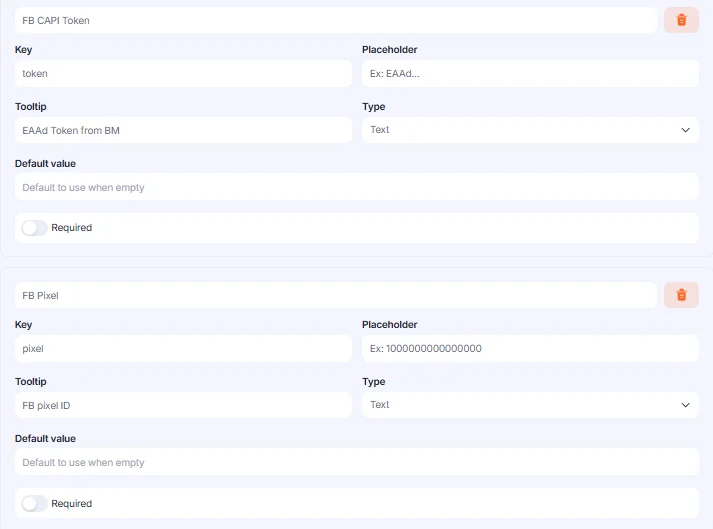
- Create Replaces that must be included in your Source and populated in the Link Generator.
- Key — enter the Field slug from AIO or the value from the Rewrites block (if applicable).
- Placeholder — enter the value that will be displayed in the Link Generator.
- Tooltip — enter the tooltip that will be displayed in the Link Generator.
- Type — select Text or Select depending on your needs.
- Default Value — enter the value that should be used by default when the field is empty, or leave it blank.
- Required — enable this toggle to make the parameter required in the Link Generator.
Rewrites
- (Optional) Add Rewrites.
If you don’t want to use field slugs in your tracking links, you can create rewrites and use custom values instead. Go to the Rewrites block and click Add Rewrite.
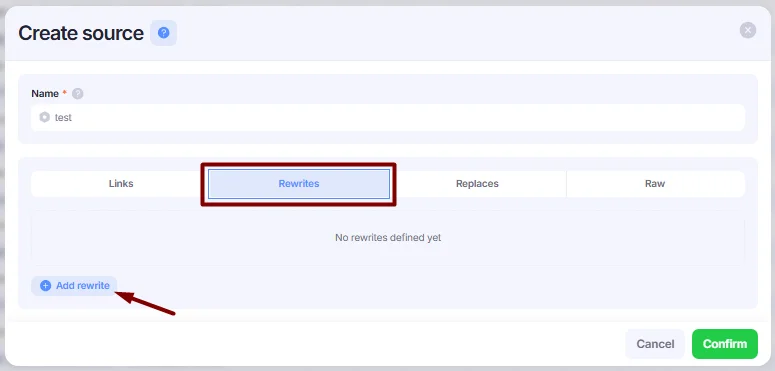
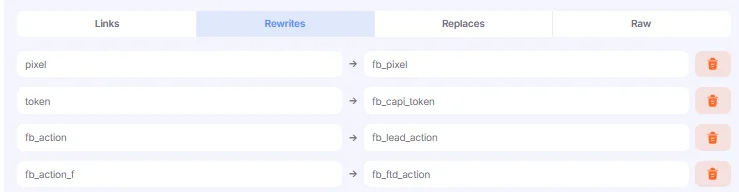
- Enter your rewrites in the From and To fields using the following format:
- From — enter the value that you want to use in your links (for example,
pixelinstead offb_pixel). - To — enter the field slug of the field that will be used to populate the value.
- Alternatively, you can view your Source in the Raw block in JSON format. Click the Code Editor button in the bottom right corner to open a larger editing window.
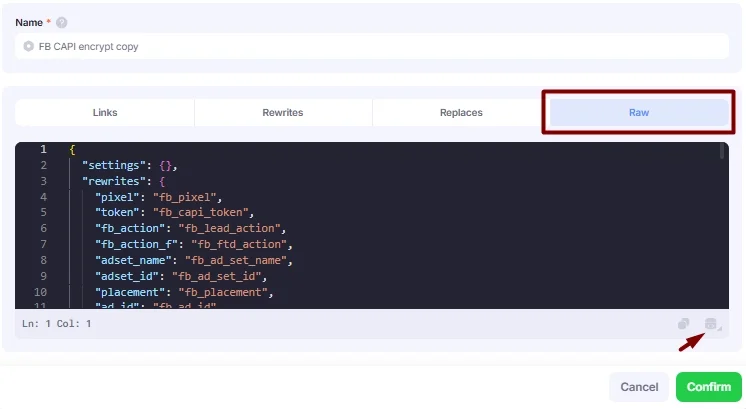
Here is an example of code used for the FB CAPI Source:
FB CAPI Source Settings code
{
  "settings": {},
  "placeholders": [],
  "replace": [
    {
      "required": true,
      "key": "creative",
      "label": "Creative",
      "placeholder": "Creative Description Goes Here",
      "description": null,
      "tooltip": "Creative description using by launcher",
      "values": null,
      "dynamic-type": "text",
      "static-data-key": null,
      "dynamic-data-type": "string",
      "value": null
    },
    {
      "required": true,
      "key": "fb_account_id",
      "label": "Account ID",
      "placeholder": "Ex: 200000000002",
      "description": null,
      "tooltip": "Facebook Account ID",
      "values": null,
      "dynamic-type": "text",
      "static-data-key": null,
      "dynamic-data-type": "string",
      "value": null
    },
    {
      "required": true,
      "key": "fb_capi_token",
      "label": "FB CAPI Token",
      "placeholder": "Ex: EAAd...",
      "description": null,
      "tooltip": "EAAd Token from BM",
      "values": null,
      "dynamic-type": "text",
      "static-data-key": null,
      "dynamic-data-type": "string",
      "value": null
    },
    {
      "required": true,
      "key": "fb_pixel",
      "label": "FB Pixel",
      "placeholder": "Ex: 1000000000000000",
      "description": null,
      "tooltip": "FB ixel ID",
      "values": null,
      "dynamic-type": "text",
      "static-data-key": null,
      "dynamic-data-type": "string",
      "value": null
    },
    {
      "required": true,
      "key": "fb_lead_action",
      "label": "FB Lead Action ( CAPI )",
      "placeholder": "Select FB Events",
      "description": "Action will be fired via CAPI for AIO Leads",
      "tooltip": null,
      "values": {
        "AddPaymentInfo": "Add Payment Info",
        "AddToCart": "Add To Cart",
        "AddToWishlist": "Add To Wishlist",
        "CompleteRegistration": "Complete Registration",
        "Contact": "Contact",
        "CustomizeProduct": "Customize Product",
        "Donate": "Donate",
        "FindLocation": "Find Location",
        "InitiateCheckout": "Initiate Checkout",
        "Lead": "Lead",
        "Purchase": "Purchase",
        "Schedule": "Schedule",
        "Search": "Search",
        "StartTrial": "Start Trial",
        "SubmitApplication": "Submit Application",
        "Subscribe": "Subscribe",
        "ViewContent": "View Content"
      },
      "dynamic-type": "select",
      "dynamic-data-type": "string",
      "static-data-key": null,
      "value": "Lead"
    },
    {
      "required": true,
      "key": "fb_ftd_action",
      "label": "FB FTD Action ( CAPI )",
      "placeholder": "Select FB Events",
      "description": "Action will be fired via CAPI for AIO FTDs",
      "tooltip": null,
      "values": {
        "AddPaymentInfo": "AddPaymentInfo",
        "AddToCart": "AddToCart",
        "AddToWishlist": "AddToWishlist",
        "CompleteRegistration": "CompleteRegistration",
        "Contact": "Contact",
        "CustomizeProduct": "CustomizeProduct",
        "Donate": "Donate",
        "FindLocation": "FindLocation",
        "InitiateCheckout": "InitiateCheckout",
        "Lead": "Lead",
        "Purchase": "Purchase",
        "Schedule": "Schedule",
        "Search": "Search",
        "StartTrial": "StartTrial",
        "SubmitApplication": "SubmitApplication",
        "Subscribe": "Subscribe",
        "ViewContent": "ViewContent"
      },
      "dynamic-type": "select",
      "dynamic-data-type": "string",
      "static-data-key": null,
      "value": "Purchase"
    }
  ],
  "links": [
    {
      "type": "link",
      "title": "FB Ad Short Link",
      "tooltip": "Copy from here",
      "description": "Inserting inside fb ad link.",
      "parameters": {
        "cuuid": {
          "type": "string",
          "key": "cuuid",
          "value": "{{aio.campaign.uuid}}"
        },
        "suuid": {
          "type": "string",
          "key": "suuid",
          "value": "{{aio.source.uuid}}"
        }
      }
    },
    {
      "type": "url_parameters",
      "title": "FB AD Parameters",
      "tooltip": "Copy from here",
      "description": "Inserting isnide FB as appendix to pass fb parameters",
      "parameters": {
        "launcher": {
          "type": "placeholder",
          "key": "launcher",
          "value": "{{aio.user.uuid}}"
        },
        "fb_account_id": {
          "type": "replace",
          "key": "fb_account_id",
          "value": "{{aio.replace}}"
        },
        "creative": {
          "type": "replace",
          "key": "creative",
          "value": "{{aio.replace}}"
        },
        "fb_pixel": {
          "type": "replace",
          "key": "fb_pixel",
          "value": "{{aio.replace}}"
        },
        "fb_capi_token": {
          "type": "replace",
          "key": "fb_capi_token",
          "value": "{{aio.replace}}"
        },
        "fb_pixel_domain": {
          "type": "replace",
          "key": "fb_pixel_domain",
          "value": "{{aio.replace}}"
        },
        "fb_lead_action": {
          "type": "replace",
          "key": "fb_lead_action",
          "value": "{{aio.replace}}"
        },
        "fb_ftd_action": {
          "type": "replace",
          "key": "fb_ftd_action",
          "value": "{{aio.replace}}"
        },
        "fb_ad_id": {
          "type": "string",
          "key": "fb_ad_id",
          "value": "{{ad.id}}"
        },
        "fb_ad_set_id": {
          "type": "string",
          "key": "fb_ad_set_id",
          "value": "{{adset.id}}"
        },
        "fb_campaign_id": {
          "type": "string",
          "key": "fb_campaign_id",
          "value": "{{campaign.id}}"
        },
        "fb_site_source_name": {
          "type": "string",
          "key": "fb_site_source_name",
          "value": "{{site_source_name}}"
        },
        "fb_ad_name": {
          "type": "string",
          "key": "fb_ad_name",
          "value": "{{ad.name}}"
        },
        "fb_ad_set_name": {
          "type": "string",
          "key": "fb_ad_set_name",
          "value": "{{adset.name}}"
        },
        "fb_campaign_name": {
          "type": "string",
          "key": "fb_campaign_name",
          "value": "{{campaign.name}}"
        },
        "fb_placement": {
          "type": "string",
          "key": "fb_placement",
          "value": "{{placement}}"
        }
      }
    },
    {
      "type": "link",
      "title": "FB Ad Full Link",
      "tooltip": "Copy from here",
      "description": "Or use full link for test.",
      "parameters": {
        "cuuid": {
          "type": "string",
          "key": "cuuid",
          "value": "{{aio.campaign.uuid}}"
        },
        "suuid": {
          "type": "string",
          "key": "suuid",
          "value": "{{aio.source.uuid}}"
        },
        "fb_account_id": {
          "type": "replace",
          "key": "fb_account_id",
          "value": "{{aio.replace}}"
        },
        "launcher": {
          "type": "placeholder",
          "key": "launcher",
          "value": "{{aio.user.uuid}}"
        },
        "creative": {
          "type": "replace",
          "key": "creative",
          "value": "{{aio.replace}}"
        },
        "fb_pixel": {
          "type": "replace",
          "key": "fb_pixel",
          "value": "{{aio.replace}}"
        },
        "fb_capi_token": {
          "type": "replace",
          "key": "fb_capi_token",
          "value": "{{aio.replace}}"
        },
        "fb_pixel_domain": {
          "type": "replace",
          "key": "fb_pixel_domain",
          "value": "{{aio.replace}}"
        },
        "fb_lead_action": {
          "type": "replace",
          "key": "fb_lead_action",
          "value": "{{aio.replace}}"
        },
        "fb_ftd_action": {
          "type": "replace",
          "key": "fb_ftd_action",
          "value": "{{aio.replace}}"
        },
        "fb_ad_id": {
          "type": "string",
          "key": "fb_ad_id",
          "value": "{{ad.id}}"
        },
        "fb_ad_set_id": {
          "type": "string",
          "key": "fb_ad_set_id",
          "value": "{{adset.id}}"
        },
        "fb_campaign_id": {
          "type": "string",
          "key": "fb_campaign_id",
          "value": "{{campaign.id}}"
        },
        "fb_site_source_name": {
          "type": "string",
          "key": "fb_site_source_name",
          "value": "{{site_source_name}}"
        },
        "fb_ad_name": {
          "type": "string",
          "key": "fb_ad_name",
          "value": "{{ad.name}}"
        },
        "fb_ad_set_name": {
          "type": "string",
          "key": "fb_ad_set_name",
          "value": "{{adset.name}}"
        },
        "fb_campaign_name": {
          "type": "string",
          "key": "fb_campaign_name",
          "value": "{{campaign.name}}"
        },
        "fb_placement": {
          "type": "string",
          "key": "fb_placement",
          "value": "{{placement}}"
        }
      }
    }
  ]
}- Click the Confirm button to save the Source. Your Source is now ready to be used for generating links in the Campaigns → Link Generator.
Please refer to How to Use the Link Generator to learn more about generating links.
Once your Source is configured, make sure to set up its postbacks in AIO. For more details, see the guide: Install 3rd-Party Postbacks in AIO.