Set Up a Default Query
Introduction
If you need to launch links containing only a domain (e.g., https://exampledomain.com) and no other parameters, you can create a Default Query, which is essentially a set of hard-coded URL parameters that you don’t need to add manually to your tracking links. All parameters added here will be automatically included in the URL, as if the visit clicked a link containing those parameters.
How To Create Default Query
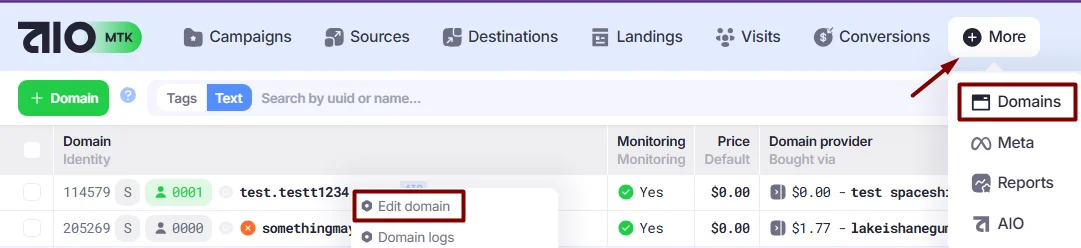
1. Go to the Domains section. Right-click the domain to open the Action Menu and choose Edit Domain.
- In the Default Query section, you can modify the Query in JSON format:
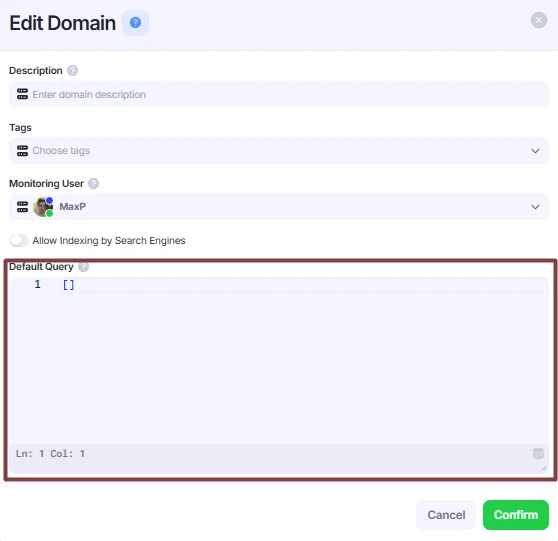
A basic setup to open a domain under a specific Campaign, Launcher, and Source:
[
{
"mode": "path",
"path": "/",
"query": {
"cuuid": "campaign uuid",
"suuid": "source uuid",
"launcher": "launcher uuid"
}
}
]
mode — defines how the default query will behave. Currently, there is a single option of path, which allows you to work with the parameter path, which description you can find below.
path — allows you to define a specific path for which the query parameters will be appended. The default value is /, but you can add different paths (e.g., /fr will open one campaign, while /de will open another). An example can be found below.
query —these are UTM parameters that will be appended to the domain when a user clicks the link. You can add as many as you like, and use any parameters you prefer — they will simply be added to the domain URL after the? symbol.
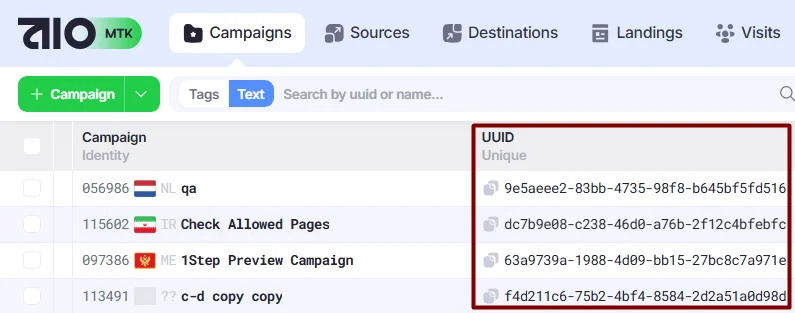
cuuid —represents the UUID of your campaign in AIO, which can be found in Campaigns→UUID:
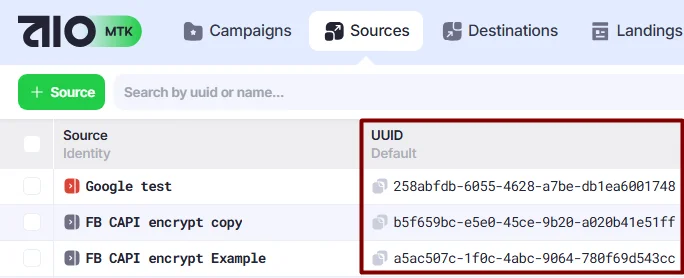
suuid —is the UUID of your source in AIO and can be found in Sources→UUID:
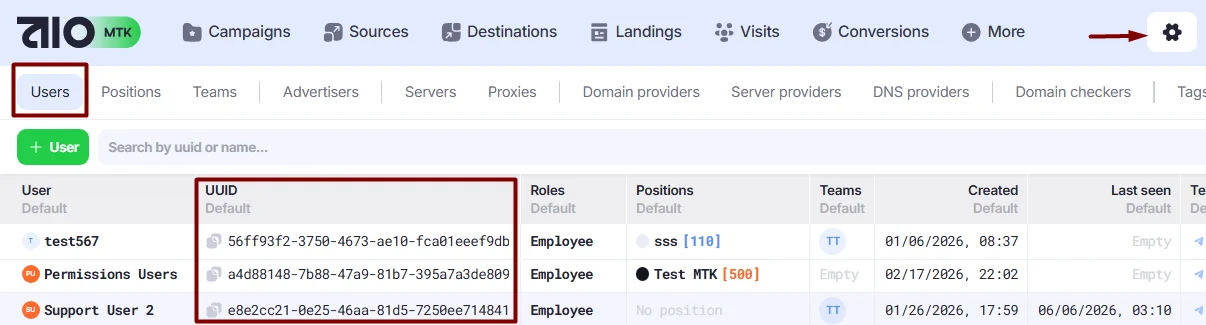
launcher —represents your user UUID, which can be found in Settings→Users→UUID:
Default Query Example
Below is the most commonly used configuration of the Default Query parameters:
[
  {
    "mode": "path",
    "path": "/",
    "query": {
      "cuuid": "2dcb6de6-b82b-410c-ae70-1864e71f5e44",
      "suuid": "f4003d5f-1c0d-4388-a79f-4a524f90d35d",
      "launcher": "cf43b624-f7de-4390-a9be-3d239ff7c98e"
	   }
  }
 ]
Path-Based Split Example:
I need a domain that redirects to three different campaigns based on the path parameter added to the URL.
I have the domain https://example-domain.com and three campaigns:
- Campaign A is launched using FR landings
- Campaign B is launched using DE landings
- Campaign C is launched using CH landings
I want Campaign B to be shown only to users from DE. This is where the path parameter comes into play. The default query for https://example-domain.com would look like this:
[
  {
    "mode": "path",
    "path": "/fr", // For domain https://example-domain.com/fr -> append this query
    "query": {
      "cuuid": "xxx1",
      "suuid": "yyy1",
      "launcher": "zzz1"
    }
  },// Result redirect: https://example-domain.com/de?cuuid=xxx&suuid=yyy&launcher=zzz
  {
    "mode": "path",
    "path": "/de", // For domain https://example-domain.com/de -> append this query
    "query": {
      "cuuid": "xxx2",
      "suuid": "yyy2",
      "launcher": "zzz2"
    }
  },// Result redirect: https://example-domain.com/de?cuuid=xxx2&suuid=yyy2&launcher=zzz2
  {
    "mode": "path",
    "path": "/ch", // For domain https://example-domain.com/ch-> append this query
    "query": {
      "cuuid": "xxx3",
      "suuid": "yyy3",
      "launcher": "zzz3"
    }
  }// Result redirect: https://example-domain.com/de?cuuid=xxx3&suuid=yyy3&launcher=zzz3
]- Click Confirm to save the changes.
Your Default Query parameters have now been added to the Domain, allowing your Campaign to be accessed directly through your domain URL.