Generate Postbacks
Introduction
Postbacks are essential for tracking conversions in AIO, as they enable accurate conversion attribution by transmitting data from the partner's system back to AIO.
A Postback URL is generated based on a conversion type within the AIO platform. This URL is triggered on the Destination side whenever a conversion occurs. This guide explains how to generate Postbacks using the two available formats, and outlines the optional parameters you can use for enhanced tracking.
You can use the standard AIO domain, app.aio.tech, or your own domain (if you already added it to AIO) to receive the Postback data.
How to Use Postback Generator
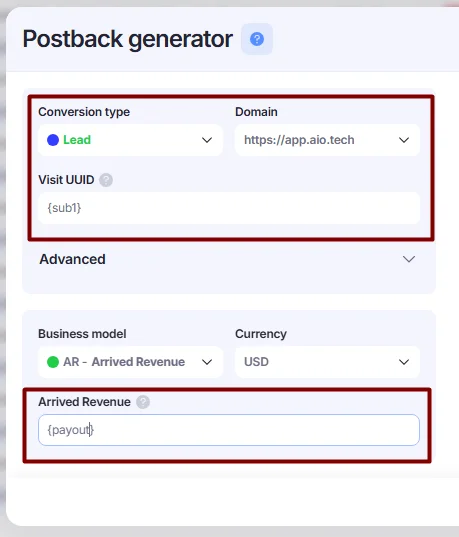
- Go to the Conversions section. Click the +Postback Generator button.

- Fill in the fields:
- Conversion type — select the conversion type that should be created in AIO when the postback is triggered.
- Domain — you can leave
https://app.aio.tech. - Visit UUID — insert the field placeholder from Destination where the click identifier (the UUID of the AIO Visit) is sent from our system (e.g.,
{sub1}). - Business Model — select the Business Model if needed, or leave the default Arrived Revenue model if you receive revenue from postbacks.
- Currency — specifies the currency in which the revenue is recorded. If the currency received is not USD, we automatically convert it to USD using up-to-date exchange rates.
- Arrived Revenue — enter the placeholder associated with the conversion, as received from the partner (e.g.,
{payout}), or enter a static actual value.
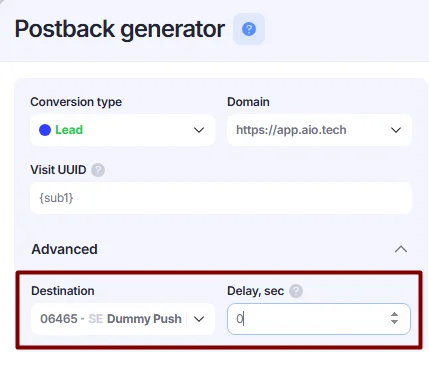
Advanced options:
- Destination — you can define a specific destination for which the postback will be triggered.
- Delay — allows you to delay the execution of the postback by a specified number of seconds. By default, the postback is triggered immediately, but you can add a delay in seconds.
- Once all parameters are defined, you can copy the postback link from the corresponding field.
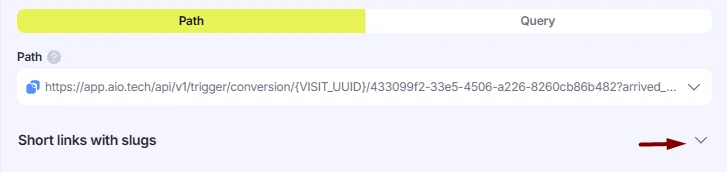
There are two available formats: Path and Query. They are equivalent and work in a similar way, but you can choose the format that best fits the platform where the postbacks are installed.
- Path — the default format, where identifiers are included in the URL path.
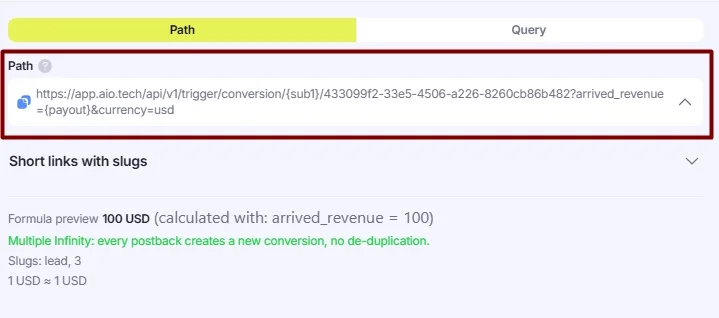
Path format. - Query — a format where identifiers are included as query parameters. It is specifically designed for platforms that can only add parameters to a link.
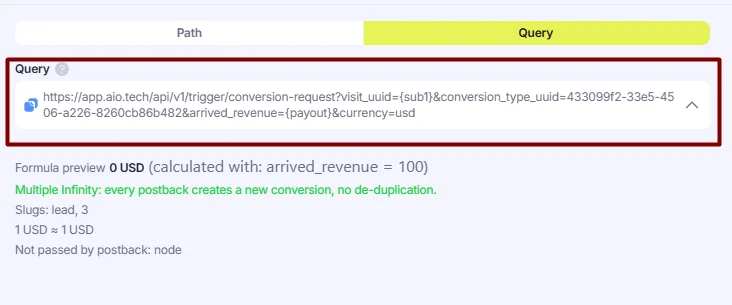
(Optional) Using Conversion Slugs Instead of UUIDs
When you select a Conversion Type in Postback Generator, AIO automatically inserts the UUID of the selected conversion type into the postback link. Alternatively, you can use slugs instead of UUIDs.

- Click the Short Link with Slugs to open the submenu.
- Postback links with slugs instead of UUIDs will be available, including all slugs configured for the selected conversion type.
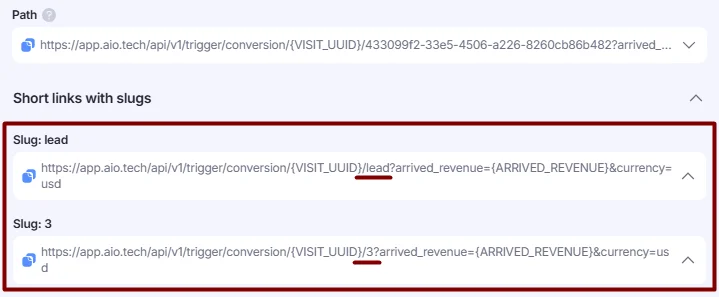
If no slugs are available, please contact our support team to configure them for you.
Uniqueness Strategies
You can use different uniqueness strategies for your conversion types. The default option is Single Conversion, but AIO also provides more flexible alternatives. To change a uniqueness strategy, please contact our support team.
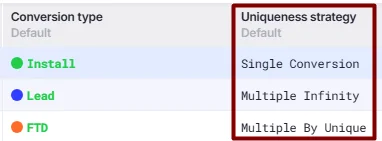
- Single Conversion (default, most commonly used)
AIO records only one conversion of the same type per visit UUID. Even if the postback is fired multiple times for the same visit UUID, it will still be counted as a single conversion.
- Multiple Infinity
AIO records every postback received for the same visit UUID as a new conversion.
⚠️ Use this option with caution, as it may lead to inflated conversion counts.
- Multiple by Unique
AIO records multiple conversions of the same type for one visit UUID only if each postback includes a different unique parameter (e.g.,
unique={click_id}). Theuniqueparameter is typically the click ID from a partner’s platform. If your conversion is of this type, make sure to addunique={your_parameter}to the postback URL for this conversion